My Aurora Forecast & Alerts
- 4.7
- Rating
- 5.00M
- Installs
- Free
- Price
 Analysis by App-foxy
I found My Aurora Forecast & Alerts most useful when I stopped treating it like a normal weather app and started using it as a planning tool for rare northern-lights opportunities. Its purpose is narrow, but that focus is exactly why it can be more helpful than a general forecast when I am deciding whether a late-night drive, a camping stop, or a trip farther north is worth the effort. The app is free, aimed at everyone, and developed by JRustonApps B.V.
My overall view is positive, with one important qualification: it can tell me when aurora conditions look promising, but it cannot turn an uncertain natural event into a guaranteed show. That distinction matters. I like the app because it helps me make a better-informed decision about timing and location, not because it removes the uncertainty that makes aurora watching difficult in the first place.
What makes the aurora information genuinely useful
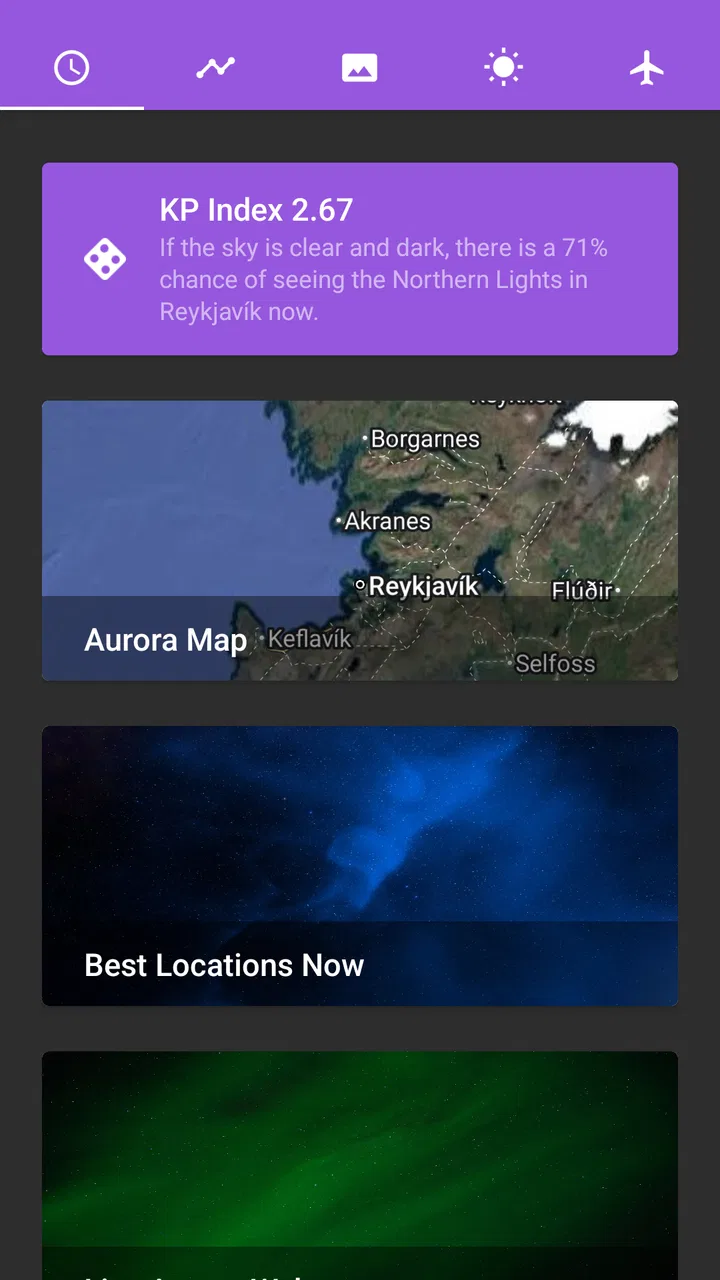
The strongest part of the experience is its specialization. A standard weather service may show cloud cover, temperature, wind, and perhaps a basic space-weather indicator, but it usually makes me assemble the aurora picture myself. This app puts the northern-lights question first. Instead of asking whether the night will be comfortable, I can focus on whether the sky may be worth watching.
You May Also Like

 Blood Strike: 2.5 Anniversary
Blood Strike’s Loadouts Turn Every Drop Into a Tactical Gamble
A close look at Blood Strike’s custom loadouts: how fast access to signature weapons reshapes its battle royale rhythm, rewards preparation, and narrows the gap between fights.

 Pandora - Music & Podcasts
Pandora’s Music Is Easy to Start, but Harder to Recover
Pandora’s strength is its low-effort path from a seed to a station. Its weak spot is how much confidence it asks you to place in connection, setup, and quiet recovery.

 8 Ball Pool
 Is Built on Rivalries, Rematches, and Routine
A close look at the rivalries, rematches, shared routines, and unanswered safety questions that turn a quick pool match into a persistent mobile community.

 Samsung Music
’s Quiet Strength Is Playing What You Already Own
Its reach comes less from spectacle than from dependable access to a personal library. That simplicity is both the app’s strongest retention engine and its ceiling.

 AccuWeather: Weather Radar
AccuWeather Review: A Quick, Clear Forecast for Everyday Decisions
For everyday plans, the best forecast is the one you can understand quickly. AccuWeather makes rain timing, radar, and local conditions easy to act on, with a few trade-offs.

 Hill Climb Racing
Why Hill Climb Racing Still Turns Crashes Into One More Run
A tiny car, a bumpy hill and one more upgrade: Hill Climb Racing keeps resurfacing because its simple chaos makes every near-miss feel personal.
More From Our News Desk



That changes how I use it in practice. Before going outside, I check the outlook, then compare it with local cloud conditions and the amount of darkness available. If the aurora indicators look encouraging but thick cloud is expected over my area, I do not interpret the alert as a promise. I treat it as a reason to investigate nearby alternatives or adjust my expectations. This simple habit prevents one of the most common mistakes: confusing strong solar activity with a visible aurora from my exact location.
The alert-focused design is especially convenient for people who do not want to monitor space-weather information constantly. I would rather receive a timely nudge than remember to open an app repeatedly during a busy evening. The practical value is not just the notification itself; it is the chance to prepare. I can charge my phone, dress properly, check a darker viewing area, and decide whether the conditions justify staying awake.
There is also a useful psychological benefit. Aurora hunting often involves waiting through several disappointing nights. A focused forecast gives that waiting some structure. I can look for a favorable window instead of going outside randomly every evening. That makes the hobby feel less like guesswork, even though uncertainty remains part of it.
Its reputation suggests that this focused approach resonates with many users. The app holds a 4.7 average from around 53 thousand ratings, and it has passed 5 million installs. Those figures do not prove that every forecast will suit every observer, but they do show that the app has become a familiar choice for people interested in the northern lights rather than a general-purpose weather audience.
How I use it before leaving home
My preferred workflow starts earlier in the day. I check whether the coming night appears worth planning around, but I do not make a final decision until shortly before going out. Forecast conditions can shift, and local visibility is often more important than an exciting headline indicator. I then look at the practical details that the app cannot replace: nearby light pollution, access to an unobstructed horizon, road safety, and whether clouds are likely to break at the right time.
For a realistic everyday example, imagine finishing work on a clear winter evening and seeing an alert while making dinner. I would not immediately drive to a distant viewpoint. First, I would check the local sky, choose a safe place with a northern-facing view, and decide how long I am willing to wait. If the outlook is only moderate, I might stay close to home. If several conditions align, I may pack a warm layer and camera support before leaving. The app helps with that decision, while common sense handles the rest.
One less obvious advantage is that alerts can encourage preparation rather than impulsive chasing. Aurora viewing is often more enjoyable when I have already thought about battery life, clothing, transport, and visibility. A notification gives me a prompt to organize those details. Without that prompt, I might notice a favorable period too late or arrive somewhere without enough time to settle in and let my eyes adjust.
I also find it useful for learning my own local pattern. After several outings, I can compare what the app suggested with what I actually saw. That personal record helps me understand how much cloud, nearby lighting, haze, and the surrounding landscape affect my results. The app becomes more valuable when I use it as one part of a repeatable observation routine rather than as an oracle.
Where it fits beside ordinary weather apps
I would not replace my regular weather service with this app. A general weather app remains better for rain timing, wind, temperature, hourly forecasts, travel conditions, and everyday decisions. If I am planning a hike, I need those details even when there is no chance of seeing an aurora.
On the other hand, a normal weather forecast is not a complete substitute here. It may tell me that the sky is clear, but a clear sky alone does not mean the northern lights will appear. My Aurora Forecast & Alerts is stronger at answering the specialized question: is there a reason to pay attention tonight? The two types of app work best together. One handles the atmosphere above my location; the other helps me judge whether aurora activity may be worth watching.
Compared with manually following space-weather websites or social feeds, this app feels more approachable. I do not need to interpret every technical update before deciding whether to step outside. That simplicity is a strength for newcomers. The trade-off is that anyone who already follows detailed solar observations may find a dedicated scientific source more informative for deep analysis. This app is built for practical awareness, not for replacing specialist research.
Its current version is 26.2.4, and it supports devices running Android 7.0 or later. That makes it accessible to people using older Android hardware, although the experience will naturally depend on the phone itself and its notification behavior. Since it is free, trying it alongside an existing weather app is easy and does not require committing to a paid forecasting service.
The limitation that matters most
The biggest weakness is not a broken interface or a missing convenience; it is the unavoidable uncertainty of aurora forecasting. An alert can be completely reasonable and still lead to a disappointing night. Clouds may arrive, the activity may remain too weak for naked-eye viewing, local light pollution may wash out the display, or the best period may happen when I am asleep or indoors.
That can make the app feel inaccurate if I expect a binary answer. In my experience, the better question is not “will I definitely see the lights?” but “are the conditions interesting enough to justify checking?” Used that way, the forecast becomes a decision aid. Used as a guarantee, it will inevitably frustrate me.
Notifications can also create pressure to react immediately. An alert may arrive at an inconvenient hour, and chasing every possibility can become tiring, especially when the viewing location is far away. I recommend setting a personal limit before using the app seriously: decide how far you are willing to travel, how long you will wait, and which conditions are strong enough to interrupt sleep. That keeps the tool useful instead of allowing it to dictate your evening.
Another practical limitation is that the app cannot understand every feature of my exact viewing spot. A nearby hill, trees, buildings, haze, and city glow can matter more than a broad regional outlook. I still need to inspect the horizon and use local weather information. Someone expecting a single screen to cover all of those variables may find the experience less decisive than anticipated.
There is also a learning curve in interpreting alerts responsibly. A beginner may see a notification and assume the whole sky will immediately turn green. I would explain it differently to a friend: the alert is a prompt to look at the broader situation, not a ticket guaranteeing a spectacular display. That small change in expectation makes a major difference to satisfaction.
Who will get the most from it
This is a strong fit for casual aurora watchers who want a simple reason to look up. It is also useful for travelers planning a northern holiday, photographers deciding whether to keep equipment ready, and families who want to turn a clear evening into an outdoor activity. Because the app is free and rated for everyone, it is easy to recommend as a low-risk starting point for someone curious about the phenomenon.
I think it is particularly helpful for people who live near the edge of aurora visibility. In those areas, the opportunity may be occasional enough that manually checking specialist sources feels excessive. An alert can make the difference between noticing a worthwhile night and missing it entirely. It is less essential for someone who lives under frequent light pollution and has no practical access to darker skies, although it can still be useful for planning a trip.
Photographers should see it as an early planning signal rather than a complete shooting assistant. I would still think about lens choice, focus, exposure, battery capacity, and a stable location separately. The app can help me decide when to prepare, but it cannot replace knowledge of my camera or the conditions at the scene.
People who should skip it are those seeking a full daily weather replacement, highly technical solar analysis, or certainty about a specific viewing minute. A general weather app is better for ordinary forecasts, while specialist space-weather resources may suit advanced observers who want deeper technical context. This app occupies the practical middle ground: more focused than a standard weather tool and easier to use than a research-heavy source.
Small habits that improve the experience
My first recommendation is to combine the alert with a local cloud check before traveling. This avoids the costly mistake of driving toward a promising activity forecast while a solid cloud layer is already covering the viewing area. If the sky is partly cloudy, I would also choose a place where gaps in the cloud are visible across a broad horizon rather than standing beside tall buildings or trees.
Second, give your eyes time to adapt. A weak aurora may be easy to miss if I keep looking at a bright phone screen. I use the app before settling into position, then reduce distractions while watching. This is a small behavioral adjustment, but it can matter more than endlessly refreshing the forecast.
Third, use alerts to prepare a flexible plan instead of a rigid one. I might choose two possible locations, one nearby and one darker, then decide after checking the latest local conditions. This approach saves time and reduces disappointment. It also recognizes that the best location is not always the farthest one; a safe, accessible place with a clear horizon can be better than an ambitious drive made too late at night.
Finally, keep a simple personal note after each outing. I record whether the sky was clear, how bright the surroundings were, and what I actually saw. Over time, that helps me interpret the app in the context of my own area. The forecast becomes more meaningful when I understand how local conditions affect the result.
My verdict after using it as a planning companion
My Aurora Forecast & Alerts succeeds because it concentrates on a specific question that ordinary weather apps answer poorly. I like its role as an alert and planning companion: it tells me when an aurora opportunity may deserve attention, then leaves room for me to verify the sky and make a sensible decision. The free price makes experimentation easy, and the accessible age rating means it can suit a wide range of curious users.
It is not a promise of visible northern lights, and I would not use it alone for travel, photography, or detailed weather planning. Its forecasts need to be combined with cloud information, darkness, local geography, and realistic expectations. That is a meaningful limitation, but it is also the honest way to use any aurora tool.
For me, the app earns a recommendation because it turns an unpredictable hobby into a more manageable routine. I can prepare when conditions look interesting, avoid unnecessary trips when the sky is clearly unsuitable, and learn from each attempt. If you want a simple way to receive aurora-focused alerts and you understand that nature still makes the final decision, this is a worthwhile addition to your Android setup.
FAQs for My Aurora Forecast & Alerts
01What is My Aurora Forecast & Alerts, and how does it work?
My Aurora Forecast & Alerts is an app designed to help users track the aurora borealis, also known as the northern lights. It provides up-to-date aurora forecasts, alerts, and viewing conditions based on your location. The app uses data from NOAA and other sources to predict when and where the aurora will be visible, making it an essential tool for aurora enthusiasts.
02Is My Aurora Forecast & Alerts free to use, or does it have in-app purchases?
The app is free to download and use, but it offers in-app purchases for premium features. These may include ad removal, enhanced notifications, and additional data sources for more precise forecasting. While the free version provides basic functionality, the premium version offers a more comprehensive experience for serious aurora hunters.
03How accurate is the aurora forecast in the app?
The accuracy of the aurora forecast in My Aurora Forecast & Alerts depends on various factors, including solar activity and weather conditions. The app uses reliable data from NOAA and other scientific sources to provide forecasts, but predictions can vary. Users are encouraged to check the app frequently and consider local conditions to increase their chances of seeing the aurora.
04Can I use My Aurora Forecast & Alerts worldwide?
Yes, My Aurora Forecast & Alerts is designed for global use. It provides forecasts and alerts for locations around the world where the aurora borealis can be seen. However, visibility is most common in high-latitude regions like Scandinavia, Canada, and Alaska. The app allows users to set specific locations to receive tailored forecasts and alerts.
05Does the app require an internet connection to function?
My Aurora Forecast & Alerts requires an internet connection to update forecasts and receive alerts. It needs to access real-time data from NOAA and other sources to provide accurate predictions. While some basic information may be available offline, an active connection is necessary for the most current and reliable updates.
Pros
- User-friendly interface for quick navigation.
- Detailed aurora visibility maps available.
- Customizable notifications for aurora alerts.
- Accurate weather forecasts included.
- Educational content on aurora science.
Cons
- Requires internet connection for updates.
- Ads can be intrusive at times.
- Limited offline functionality.
- Some features are subscription-based.
- Battery consumption can be high.

My Aurora Forecast & Alerts
Gallery